




 Create PTR record
Dynu gives you full control over all the DNS configurations for your domain names.
You can log onto the control panel to manage your DNS records.
To add a PTR record in the control panel, you may follow these 3 steps.
 Step 2
Go to DNS Records
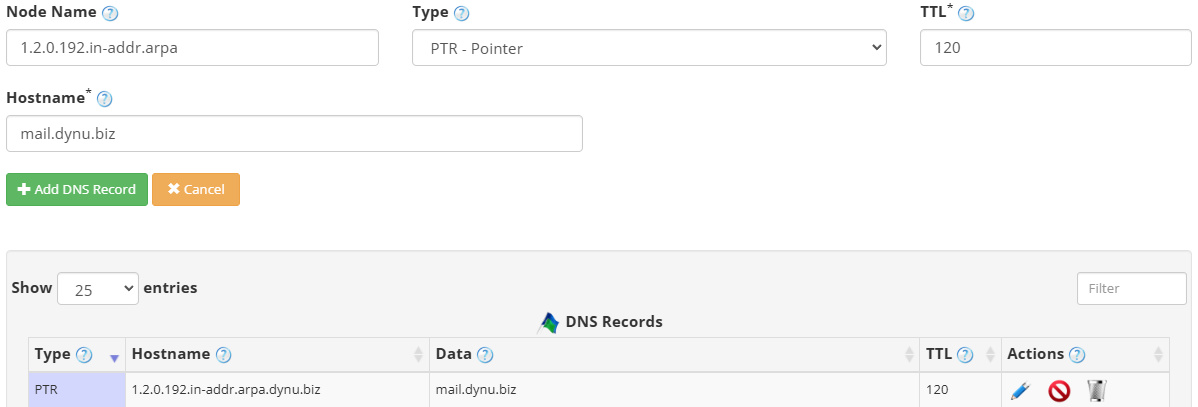
to add a PTR record. The screenshot below shows how to add a PTR record for dynu.biz.
DNS Records
to add a PTR record. The screenshot below shows how to add a PTR record for dynu.biz.
Node Name The reversed IP address followed by the reverse DNS zone. For an IPv4 address such as 192.0.2.1, the node name would be 1.2.0.192.in-addr.arpa.
Type Choose "PTR - Pointer".
TTL How long the server should cache the information. The TTL is set in seconds, 60 is 1 minute, 1800 is 30 minutes.
Hostname The fully qualified domain name that the IP address should resolve to, for example mail.dynu.biz. This hostname must have a corresponding A or AAAA record pointing back to the same IP address for forward-confirmed reverse DNS.
Step 3
Check if your PTR record has gone into effect using the DNS Lookup tool. Enter 1.2.0.192.in-addr.arpa as Hostname, and choose "PTR - Pointer" as Type.
What is a PTR record?
PTR records (Pointer Records) are used for reverse DNS lookups. An IP address can be associated to a domain or hostname. This is opposite to what an A/AAAA record does for forward lookup zones. PTR records go into reverse DNS zones which end with .in-addr.arpa for IPv4 or .ip6.arpa for IPv6 addresses. It is used to verify if a server name is actually associated with the IP address from which it is sending.How to add a PTR record?
To add a PTR record in the control panel, you may follow these 3 steps.
 Step 2
Go to
DNS Records
to add a PTR record. The screenshot below shows how to add a PTR record for dynu.biz.
Node Name The reversed IP address followed by the reverse DNS zone. For an IPv4 address such as 192.0.2.1, the node name would be 1.2.0.192.in-addr.arpa.
Type Choose "PTR - Pointer".
TTL How long the server should cache the information. The TTL is set in seconds, 60 is 1 minute, 1800 is 30 minutes.
Hostname The fully qualified domain name that the IP address should resolve to, for example mail.dynu.biz. This hostname must have a corresponding A or AAAA record pointing back to the same IP address for forward-confirmed reverse DNS.
Step 3
Check if your PTR record has gone into effect using the DNS Lookup tool. Enter 1.2.0.192.in-addr.arpa as Hostname, and choose "PTR - Pointer" as Type.