




 Create SVCB record
Dynu gives you full control over all the DNS configurations for your domain names.
You can log onto the control panel to manage your DNS records.
To add an SVCB record in the control panel, you may follow these 3 steps.
 Step 2
Go to DNS Records
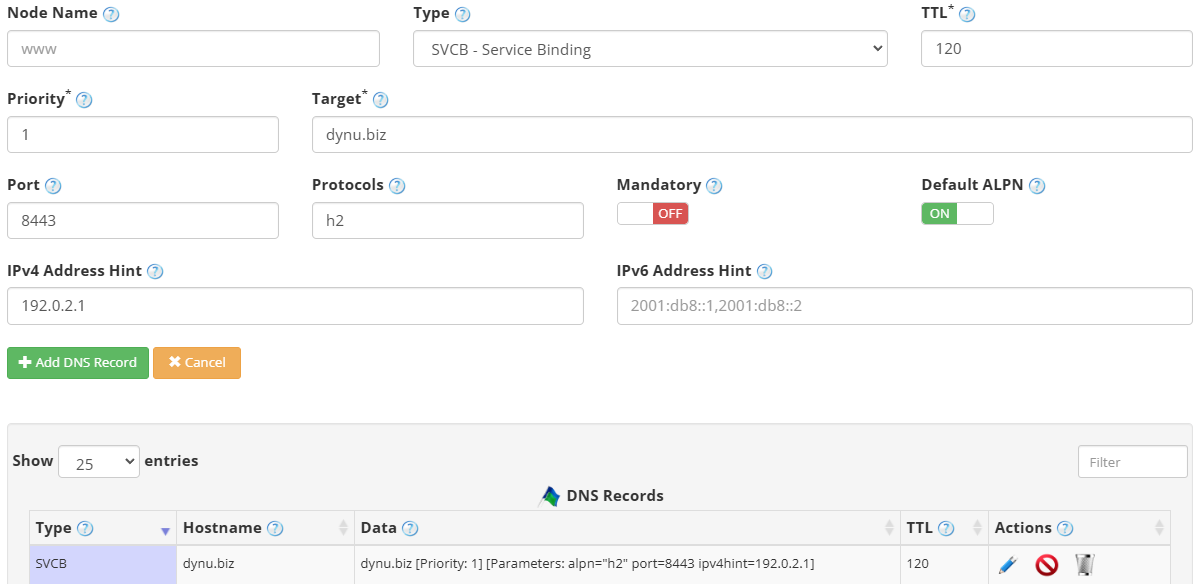
to add an SVCB record. The screenshot below shows how to add an SVCB record for dynu.biz.
We are leaving the node name empty because it is for the primary domain name dynu.biz.
DNS Records
to add an SVCB record. The screenshot below shows how to add an SVCB record for dynu.biz.
We are leaving the node name empty because it is for the primary domain name dynu.biz.
Node Name Enter the service name for which you need the SVCB record, for example _foo._tcp. Leave empty for the primary domain name.
Type Choose "SVCB - Service Binding".
TTL How long the server should cache the information. The TTL is set in seconds, 60 is 1 minute, 1800 is 30 minutes.
Priority A number from 0 to 65535. A value of 0 sets AliasMode, redirecting the service to another domain. A value greater than 0 sets ServiceMode, where lower values are preferred.
Target The fully qualified domain name of the target endpoint. Use a single dot (.) to indicate the service is at the owner name itself.
Parameters Optional service parameters in key=value format, for example alpn="h2", port="8443", or ipv4hint="192.0.2.1". Leave empty for AliasMode records.
Step 3
Check if your SVCB record has gone into effect using the DNS Lookup tool. Enter dynu.biz as Hostname, and choose "SVCB - Service Binding" as Type.

What is an SVCB record?
An SVCB (Service Binding) record is a DNS record type used to convey information about how to reach an alternative endpoint for a service, along with parameters that describe how to connect to it. Standardized in RFC 9460, SVCB records allow clients to discover preferred protocols, ports, and IP hints before a connection is attempted, reducing round trips and improving performance.How to add an SVCB record?
To add an SVCB record in the control panel, you may follow these 3 steps.
 Step 2
Go to
DNS Records
to add an SVCB record. The screenshot below shows how to add an SVCB record for dynu.biz.
We are leaving the node name empty because it is for the primary domain name dynu.biz.
Node Name Enter the service name for which you need the SVCB record, for example _foo._tcp. Leave empty for the primary domain name.
Type Choose "SVCB - Service Binding".
TTL How long the server should cache the information. The TTL is set in seconds, 60 is 1 minute, 1800 is 30 minutes.
Priority A number from 0 to 65535. A value of 0 sets AliasMode, redirecting the service to another domain. A value greater than 0 sets ServiceMode, where lower values are preferred.
Target The fully qualified domain name of the target endpoint. Use a single dot (.) to indicate the service is at the owner name itself.
Parameters Optional service parameters in key=value format, for example alpn="h2", port="8443", or ipv4hint="192.0.2.1". Leave empty for AliasMode records.
Step 3
Check if your SVCB record has gone into effect using the DNS Lookup tool. Enter dynu.biz as Hostname, and choose "SVCB - Service Binding" as Type.