




 Create CERT record
Dynu gives you full control over all the DNS configurations for your domain names.
You can log onto the control panel to manage your DNS records.
To add a CERT record in the control panel, you may follow these 3 steps.
 Step 2
Go to DNS Records
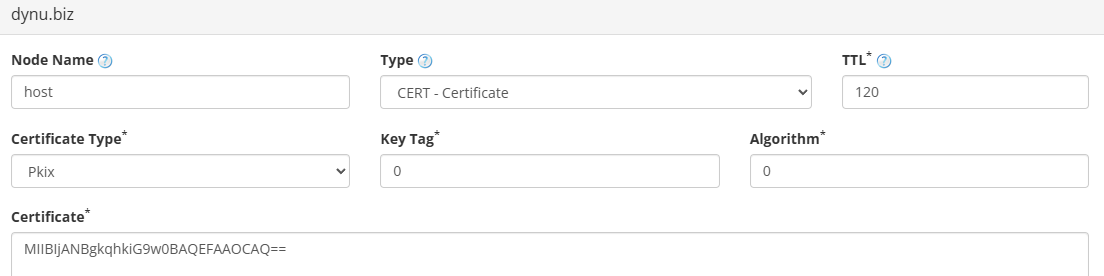
to add a CERT record. The screenshot below shows how to add a CERT record for dynu.biz.
DNS Records
to add a CERT record. The screenshot below shows how to add a CERT record for dynu.biz.
Node Name The host name for this record. For example, leave it blank for the root domain or enter host to apply the record to host.dynu.biz.
Type Choose "CERT - Certificate".
TTL How long the server should cache the information. The TTL is set in seconds, 60 is 1 minute, 1800 is 30 minutes.
Certificate Type Specifies the type of certificate being published. Common values are PKIX (X.509 as per PKIX), SPKI (Simple Public Key Infrastructure), PGP (OpenPGP packet), or IPKIX (URL of an X.509 data object).
Key Tag A numeric identifier for the key contained in the certificate. Use 0 if no key tag applies.
Algorithm Identifies the cryptographic algorithm used by the key. Use 0 if no algorithm is specified, or the appropriate IANA-assigned value (e.g., 5 for RSA/SHA-1, 8 for RSA/SHA-256).
Certificate The actual certificate or certificate revocation list data, provided in hexadecimal format.
Step 3
Check if your CERT record has gone into effect using the DNS Lookup tool. Enter host.dynu.biz as Hostname, and choose "CERT - Certificate" as Type.

What is a CERT record?
CERT records, specified in RFC 4398, are used to store public key certificates and related certificate revocation lists in the DNS. They allow applications to retrieve cryptographic certificates — such as PKIX, SPKI, PGP, or X.509 — directly from a domain's DNS, which can be useful for verifying identities and securing communications.How to add a CERT record?
To add a CERT record in the control panel, you may follow these 3 steps.
 Step 2
Go to
DNS Records
to add a CERT record. The screenshot below shows how to add a CERT record for dynu.biz.
Node Name The host name for this record. For example, leave it blank for the root domain or enter host to apply the record to host.dynu.biz.
Type Choose "CERT - Certificate".
TTL How long the server should cache the information. The TTL is set in seconds, 60 is 1 minute, 1800 is 30 minutes.
Certificate Type Specifies the type of certificate being published. Common values are PKIX (X.509 as per PKIX), SPKI (Simple Public Key Infrastructure), PGP (OpenPGP packet), or IPKIX (URL of an X.509 data object).
Key Tag A numeric identifier for the key contained in the certificate. Use 0 if no key tag applies.
Algorithm Identifies the cryptographic algorithm used by the key. Use 0 if no algorithm is specified, or the appropriate IANA-assigned value (e.g., 5 for RSA/SHA-1, 8 for RSA/SHA-256).
Certificate The actual certificate or certificate revocation list data, provided in hexadecimal format.
Step 3
Check if your CERT record has gone into effect using the DNS Lookup tool. Enter host.dynu.biz as Hostname, and choose "CERT - Certificate" as Type.