




 Create Key record
Dynu gives you full control over all the DNS configurations for your domain names.
You can log onto the control panel to manage your DNS records.
To add a KEY record in the control panel, you may follow these 3 steps.
 Step 2
Go to DNS Records
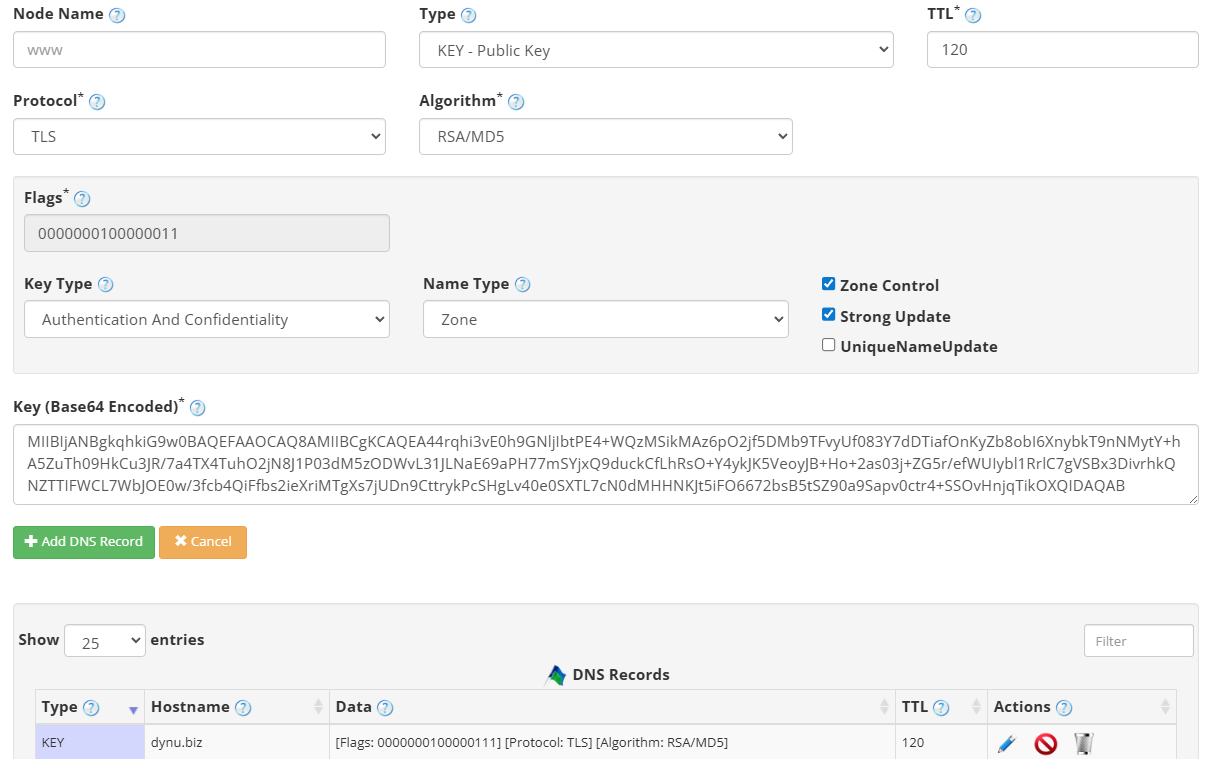
to add a KEY record. The screenshot below shows how to add a KEY record for dynu.biz.
We are leaving the node name empty because it is for the primary domain name dynu.biz.
DNS Records
to add a KEY record. The screenshot below shows how to add a KEY record for dynu.biz.
We are leaving the node name empty because it is for the primary domain name dynu.biz.
Node Name Enter the subdomain name for which you need the KEY record, for example, subdomain1. Leave empty for the primary domain name.
Type Choose "KEY - Key Record".
TTL How long the server should cache the information. The TTL is set in seconds, 60 is 1 minute, 1800 is 30 minutes.
Protocol An 8-bit value specifying the protocol for which the key is intended. Use 3 for DNSSEC, 1 for TLS, 2 for email, 4 for IPsec, or 255 for all protocols.
Algorithm Identifies the public key cryptographic algorithm. Common values are 1 (RSA/MD5), 3 (DSA/SHA-1), and 5 (RSA/SHA-1).
Flags A 16-bit integer that controls the interpretation and intended use of the key. It is automatically generated based on the value of the Key Type and Name Type.
Public Key The public key data in PEM, Base64 or Hex format. In the example, we used a Base64 key.
Step 3
Check if your KEY record has gone into effect using the DNS Lookup tool. Enter dynu.biz as Hostname, and choose "KEY - Key Record" as Type.
What is a KEY record?
KEY record is a type of DNS record used to store a public key that is associated with a DNS name. Originally defined in RFC 2535 as part of the DNS Security Extensions (DNSSEC), the KEY record allows the DNS to function as a public key distribution mechanism, supporting both DNS security itself and other protocols such as TLS, email, and IPsec.How to add a KEY record?
To add a KEY record in the control panel, you may follow these 3 steps.
 Step 2
Go to
DNS Records
to add a KEY record. The screenshot below shows how to add a KEY record for dynu.biz.
We are leaving the node name empty because it is for the primary domain name dynu.biz.
Node Name Enter the subdomain name for which you need the KEY record, for example, subdomain1. Leave empty for the primary domain name.
Type Choose "KEY - Key Record".
TTL How long the server should cache the information. The TTL is set in seconds, 60 is 1 minute, 1800 is 30 minutes.
Protocol An 8-bit value specifying the protocol for which the key is intended. Use 3 for DNSSEC, 1 for TLS, 2 for email, 4 for IPsec, or 255 for all protocols.
Algorithm Identifies the public key cryptographic algorithm. Common values are 1 (RSA/MD5), 3 (DSA/SHA-1), and 5 (RSA/SHA-1).
Flags A 16-bit integer that controls the interpretation and intended use of the key. It is automatically generated based on the value of the Key Type and Name Type.
Public Key The public key data in PEM, Base64 or Hex format. In the example, we used a Base64 key.
Step 3
Check if your KEY record has gone into effect using the DNS Lookup tool. Enter dynu.biz as Hostname, and choose "KEY - Key Record" as Type.