




 Create LOC record
Dynu gives you full control over all the DNS configurations for your domain names.
You can log onto the control panel to manage your DNS records.
To add a LOC record in the control panel, you may follow these 3 steps.
 Step 2
Go to DNS Records
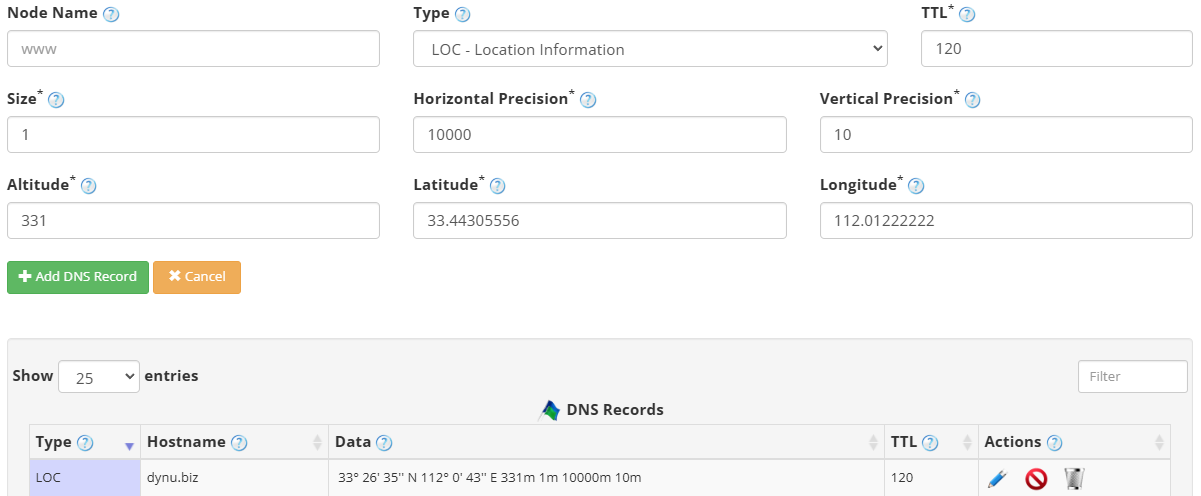
to add a LOC record. The screenshot below shows how to add a LOC record for dynu.biz.
We are leaving the node name empty because it is for the primary domain name dynu.biz.
DNS Records
to add a LOC record. The screenshot below shows how to add a LOC record for dynu.biz.
We are leaving the node name empty because it is for the primary domain name dynu.biz.
Node Name Enter the subdomain name for which you need the LOC record, for example server1. Leave empty for the primary domain name.
Type Choose "LOC - Location Information".
TTL How long the server should cache the information. The TTL is set in seconds, 60 is 1 minute, 1800 is 30 minutes.
Size The diameter of the location in meters. For example, 1m for a single host.
Horizontal Precision The horizontal precision of the location in meters. For example, 10000m.
Vertical Precision The vertical precision of the location in meters. For example, 10m.
Altitude The altitude in meters above sea level. For example, 331m.
Latitude The latitude of the location in degrees, minutes, and seconds, followed by N or S. For example, 33 26 35.000 N.
Longitude The longitude of the location in degrees, minutes, and seconds, followed by E or W. For example, 112 00 44.000 W.
Step 3
Check if your LOC record has gone into effect using the DNS Lookup tool. Enter dynu.biz as Hostname, and choose "LOC - Location" as Type.
What is a LOC record?
LOC records allow you to specify a physical location for a domain name. It contains Latitude, Longitude and Altitude information as well as host/subnet physical size and location accuracy. This information can be queried by other computers connected to the Internet.How to add a LOC record?
To add a LOC record in the control panel, you may follow these 3 steps.
 Step 2
Go to
DNS Records
to add a LOC record. The screenshot below shows how to add a LOC record for dynu.biz.
We are leaving the node name empty because it is for the primary domain name dynu.biz.
Node Name Enter the subdomain name for which you need the LOC record, for example server1. Leave empty for the primary domain name.
Type Choose "LOC - Location Information".
TTL How long the server should cache the information. The TTL is set in seconds, 60 is 1 minute, 1800 is 30 minutes.
Size The diameter of the location in meters. For example, 1m for a single host.
Horizontal Precision The horizontal precision of the location in meters. For example, 10000m.
Vertical Precision The vertical precision of the location in meters. For example, 10m.
Altitude The altitude in meters above sea level. For example, 331m.
Latitude The latitude of the location in degrees, minutes, and seconds, followed by N or S. For example, 33 26 35.000 N.
Longitude The longitude of the location in degrees, minutes, and seconds, followed by E or W. For example, 112 00 44.000 W.
Step 3
Check if your LOC record has gone into effect using the DNS Lookup tool. Enter dynu.biz as Hostname, and choose "LOC - Location" as Type.