




 Create OPENPGPKEY record
Dynu gives you full control over all the DNS configurations for your domain names.
You can log onto the control panel to manage your DNS records.
To add an OPENPGPKEY record in the control panel, you may follow these 3 steps.
 Step 2
Go to DNS Records
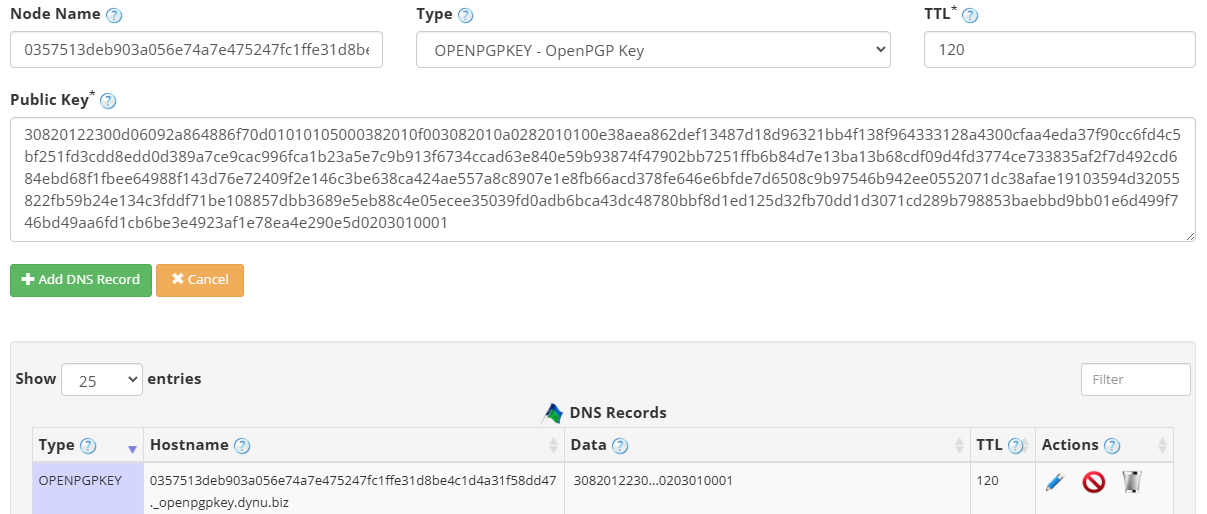
to add an OPENPGPKEY record. The screenshot below shows how to add an OPENPGPKEY record for dynu.biz.
DNS Records
to add an OPENPGPKEY record. The screenshot below shows how to add an OPENPGPKEY record for dynu.biz.
Node Name The SHA-256 hash of the local part of the email address, truncated to 28 octets, followed by ._openpgpkey. For example, for alice@dynu.biz this would be the hash of alice. Most OpenPGP tools can generate this value automatically.
Type Choose "OPENPGPKEY - OpenPGP Key".
TTL How long the server should cache the information. The TTL is set in seconds, 60 is 1 minute, 1800 is 30 minutes.
Public Key The OpenPGP public key data in PEM, Hex or Base64 format.The example used a PEM format and our system will saves the key data in Base64 format. Base64 format can be exported from your OpenPGP application using a command such as gpg --export alice@dynu.biz | base64.
Step 3
Check if your OPENPGPKEY record has gone into effect using the DNS Lookup tool. Enter 0357513deb903a056e74a7e475247fc1ffe31d8be4c1d4a31f58dd47._openpgpkey.dynu.biz as Hostname, and choose "OPENPGPKEY - OpenPGP Key" as Type.

What is an OPENPGPKEY record?
OPENPGPKEY records, specified in RFC 7929, allow OpenPGP public keys to be published directly in DNS. This makes it possible for email clients to automatically retrieve the correct public key for an email address via a DNS query, enabling end-to-end encrypted email without relying on key servers or manual key exchange.How to add an OPENPGPKEY record?
To add an OPENPGPKEY record in the control panel, you may follow these 3 steps.
 Step 2
Go to
DNS Records
to add an OPENPGPKEY record. The screenshot below shows how to add an OPENPGPKEY record for dynu.biz.
Node Name The SHA-256 hash of the local part of the email address, truncated to 28 octets, followed by ._openpgpkey. For example, for alice@dynu.biz this would be the hash of alice. Most OpenPGP tools can generate this value automatically.
Type Choose "OPENPGPKEY - OpenPGP Key".
TTL How long the server should cache the information. The TTL is set in seconds, 60 is 1 minute, 1800 is 30 minutes.
Public Key The OpenPGP public key data in PEM, Hex or Base64 format.The example used a PEM format and our system will saves the key data in Base64 format. Base64 format can be exported from your OpenPGP application using a command such as gpg --export alice@dynu.biz | base64.
Step 3
Check if your OPENPGPKEY record has gone into effect using the DNS Lookup tool. Enter 0357513deb903a056e74a7e475247fc1ffe31d8be4c1d4a31f58dd47._openpgpkey.dynu.biz as Hostname, and choose "OPENPGPKEY - OpenPGP Key" as Type.