




 Create DNAME record
Dynu gives you full control over all the DNS configurations for your domain names.
You can log onto the control panel to manage your DNS records.
To add a DNAME record in the control panel, you may follow these 3 steps.
 Step 2
Go to DNS Records
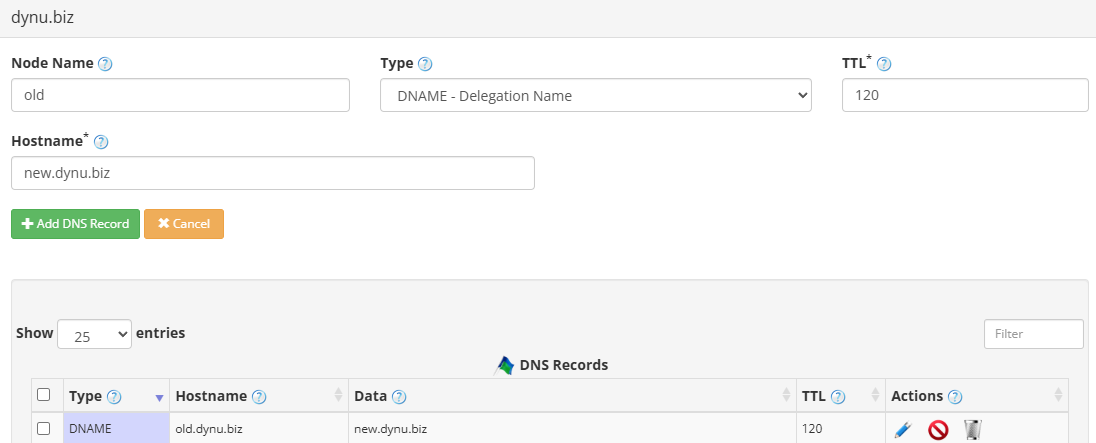
to add a DNAME record. The screenshot below shows how to add a DNAME record for dynu.biz.
DNS Records
to add a DNAME record. The screenshot below shows how to add a DNAME record for dynu.biz.
Node Name The subdomain name whose entire subtree will be aliased. For example, enter old to redirect old.dynu.biz and all of its subdomains to another domain.
Type Choose "DNAME - Delegation Name".
TTL How long the server should cache the information. The TTL is set in seconds, 60 is 1 minute, 1800 is 30 minutes.
Hostname The target domain name to which the entire subtree should be redirected. For example, example.com would cause any subdomain of the node name to resolve to the corresponding subdomain of example.com.
Step 3
Check if your DNAME record has gone into effect using the DNS Lookup tool. Enter old.dynu.biz as Hostname, and choose "DNAME - Delegation Name" as Type.

What is a DNAME record?
DNAME records, specified in RFC 6672, create an alias for an entire subtree of the domain name space. Unlike a CNAME, which only aliases a single name, a DNAME redirects all subdomains of one domain to another, making it useful for renaming or restructuring domains without updating each individual record.How to add a DNAME record?
To add a DNAME record in the control panel, you may follow these 3 steps.
 Step 2
Go to
DNS Records
to add a DNAME record. The screenshot below shows how to add a DNAME record for dynu.biz.
Node Name The subdomain name whose entire subtree will be aliased. For example, enter old to redirect old.dynu.biz and all of its subdomains to another domain.
Type Choose "DNAME - Delegation Name".
TTL How long the server should cache the information. The TTL is set in seconds, 60 is 1 minute, 1800 is 30 minutes.
Hostname The target domain name to which the entire subtree should be redirected. For example, example.com would cause any subdomain of the node name to resolve to the corresponding subdomain of example.com.
Step 3
Check if your DNAME record has gone into effect using the DNS Lookup tool. Enter old.dynu.biz as Hostname, and choose "DNAME - Delegation Name" as Type.