




 Create DHCID record
Dynu gives you full control over all the DNS configurations for your domain names.
You can log onto the control panel to manage your DNS records.
To add a DHCID record in the control panel, you may follow these 3 steps.
 Step 2
Go to DNS Records
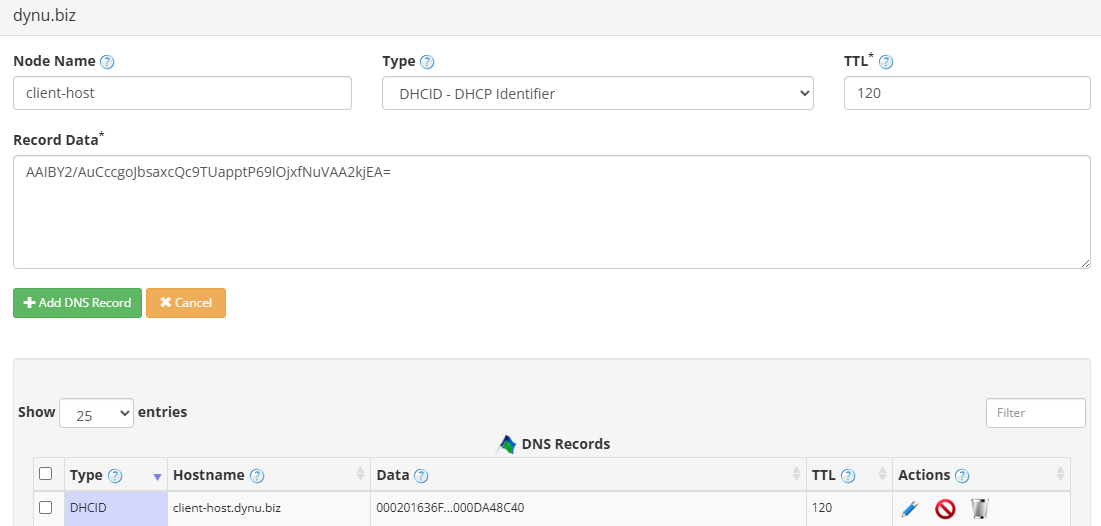
to add a DHCID record. The screenshot below shows how to add a DHCID record for dynu.biz.
DNS Records
to add a DHCID record. The screenshot below shows how to add a DHCID record for dynu.biz.
Node Name The host name for this record. For example, leave it blank for the root domain or enter clienthost to apply the record to clienthost.dynu.biz.
Type Choose "DHCID - DHCP Identifier".
TTL How long the server should cache the information. The TTL is set in seconds, 60 is 1 minute, 1800 is 30 minutes.
Record Data The DHCID data in Base64 format. This value is typically generated by the DHCP server and contains a one-way hash that uniquely identifies the DHCP client associated with the hostname.
Step 3
Check if your DHCID record has gone into effect using the DNS Lookup tool. Enter clienthost.dynu.biz as Hostname, and choose "DHCID - DHCP Identifier" as Type.

What is a DHCID record?
DHCID records, specified in RFC 4701, are used to associate a DNS domain name with the DHCP client that owns it. They help prevent conflicts when multiple DHCP clients attempt to register the same hostname, ensuring that only the legitimate client can update or modify the corresponding DNS records.How to add a DHCID record?
To add a DHCID record in the control panel, you may follow these 3 steps.
 Step 2
Go to
DNS Records
to add a DHCID record. The screenshot below shows how to add a DHCID record for dynu.biz.
Node Name The host name for this record. For example, leave it blank for the root domain or enter clienthost to apply the record to clienthost.dynu.biz.
Type Choose "DHCID - DHCP Identifier".
TTL How long the server should cache the information. The TTL is set in seconds, 60 is 1 minute, 1800 is 30 minutes.
Record Data The DHCID data in Base64 format. This value is typically generated by the DHCP server and contains a one-way hash that uniquely identifies the DHCP client associated with the hostname.
Step 3
Check if your DHCID record has gone into effect using the DNS Lookup tool. Enter clienthost.dynu.biz as Hostname, and choose "DHCID - DHCP Identifier" as Type.