




 Create URI record
Dynu gives you full control over all the DNS configurations for your domain names.
You can log onto the control panel to manage your DNS records.
To add a URI record in the control panel, you may follow these 3 steps.
 Step 2
Go to DNS Records
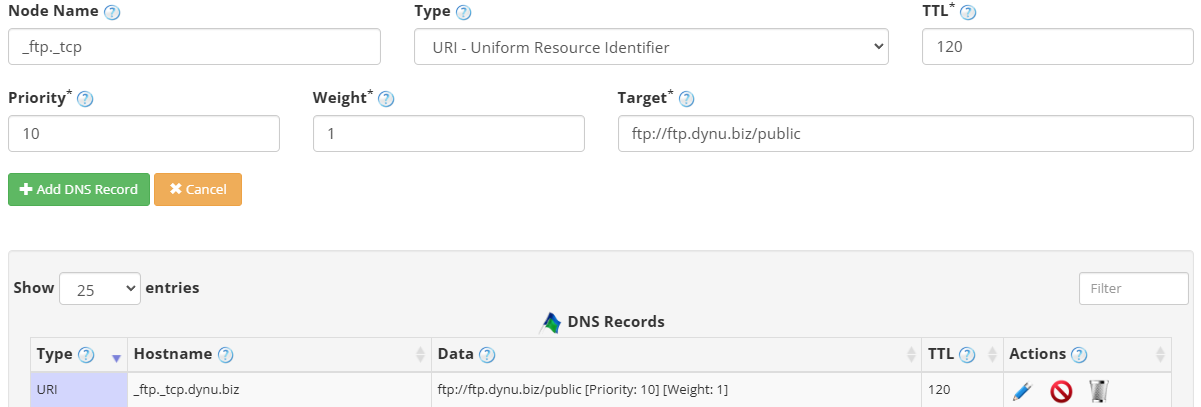
to add a URI record. The screenshot below shows how to add a URI record for dynu.biz.
DNS Records
to add a URI record. The screenshot below shows how to add a URI record for dynu.biz.
Node Name The service and protocol prefix for the URI record, for example _ftp._tcp. This identifies the service type and transport protocol the URI applies to.
Type Choose "URI - Uniform Resource Identifier".
TTL How long the server should cache the information. The TTL is set in seconds, 60 is 1 minute, 1800 is 30 minutes.
Priority The order in which URI records are tried. Lower values have higher priority. For example, a record with priority 10 would be tried before one with 20.
Weight Used for load balancing between URI records of equal priority. Records with a higher weight value are selected more often. For example, 1.
Target The URI that the record points to, enclosed in quotes. For example, "ftp://ftp.dynu.biz/public".
Step 3
Check if your URI record has gone into effect using the DNS Lookup tool. Enter _ftp._tcp.dynu.biz as Hostname, and choose "URI - Uniform Resource Identifier" as Type.

What is a URI record?
URI records provide a means to resolve hostnames to URIs that can be used by various applications. For resolution the application needs to know both the hostname and the protocol that the URI is to be used for. Similar to the SRV record, it returns both weight and priority values which can be used to select an appropriate URI from multiple results. Unlike SRV, no port number is returned since this information is contained in the URI string itself.How to add a URI record?
To add a URI record in the control panel, you may follow these 3 steps.
 Step 2
Go to
DNS Records
to add a URI record. The screenshot below shows how to add a URI record for dynu.biz.
Node Name The service and protocol prefix for the URI record, for example _ftp._tcp. This identifies the service type and transport protocol the URI applies to.
Type Choose "URI - Uniform Resource Identifier".
TTL How long the server should cache the information. The TTL is set in seconds, 60 is 1 minute, 1800 is 30 minutes.
Priority The order in which URI records are tried. Lower values have higher priority. For example, a record with priority 10 would be tried before one with 20.
Weight Used for load balancing between URI records of equal priority. Records with a higher weight value are selected more often. For example, 1.
Target The URI that the record points to, enclosed in quotes. For example, "ftp://ftp.dynu.biz/public".
Step 3
Check if your URI record has gone into effect using the DNS Lookup tool. Enter _ftp._tcp.dynu.biz as Hostname, and choose "URI - Uniform Resource Identifier" as Type.