




 Create HTTPS record
Dynu gives you full control over all the DNS configurations for your domain names.
You can log onto the control panel to manage your DNS records.
To add an HTTPS record in the control panel, you may follow these 3 steps.
 Step 2
Go to DNS Records
to add an HTTPS record. The screenshot below shows how to add an HTTPS record for dynu.biz.
We are leaving the node name empty because it is for the primary domain name dynu.biz.
DNS Records
to add an HTTPS record. The screenshot below shows how to add an HTTPS record for dynu.biz.
We are leaving the node name empty because it is for the primary domain name dynu.biz.
Node Name Enter the subdomain name for which you need the HTTPS record, for example, www. Leave empty for the primary domain name.
Type Choose "HTTPS - HTTPS Service Binding".
TTL How long the server should cache the information. The TTL is set in seconds, 60 is 1 minute, 1800 is 30 minutes.
Priority A number from 0 to 65535. A value of 0 sets the record to AliasMode, which redirects the service to another domain name. A value greater than 0 sets ServiceMode, where lower values are preferred.
Target The fully qualified domain name of the target endpoint. Use a single dot (.) to indicate the service is at the owner name itself.
Port The TCP or UDP port number of the HTTPS endpoint, if different from the default port 443.
Protocols A comma-separated list of Application-Layer Protocol Negotiation (ALPN) protocol identifiers supported by the service, such as h2 for HTTP/2 or h3 for HTTP/3 over QUIC.
Mandatory Force usage of certain protocols only.
Default ALPN A flag indicating that the default HTTPS protocol should not be assumed; only the protocols explicitly listed in the alpn parameter are supported by this endpoint.
IPv4 Address Hint A comma-separated list of IPv4 addresses that clients may use as a connection hint for the target, avoiding a separate A record lookup.
IPv6 Address Hint A comma-separated list of IPv6 addresses that clients may use as a connection hint for the target, avoiding a separate AAAA record lookup.
Step 3
Check if your HTTPS record has gone into effect using the DNS Lookup tool. Enter dynu.biz as Hostname, and choose "HTTPS - HTTPS Service Binding" as Type.

What is an HTTPS record?
HTTPS record is a type of DNS record specifically designed for HTTP and HTTPS services, standardized in RFC 9460. It gives clients the information they need to connect to a web service before a connection is even attempted, improving both performance and privacy. The HTTPS record can advertise which application-layer protocols a service supports, provide IP address hints for faster connection setup, and allow apex domain aliasing without the restrictions of a CNAME record.How to add an HTTPS record?
To add an HTTPS record in the control panel, you may follow these 3 steps.
 Step 2
Go to
DNS Records
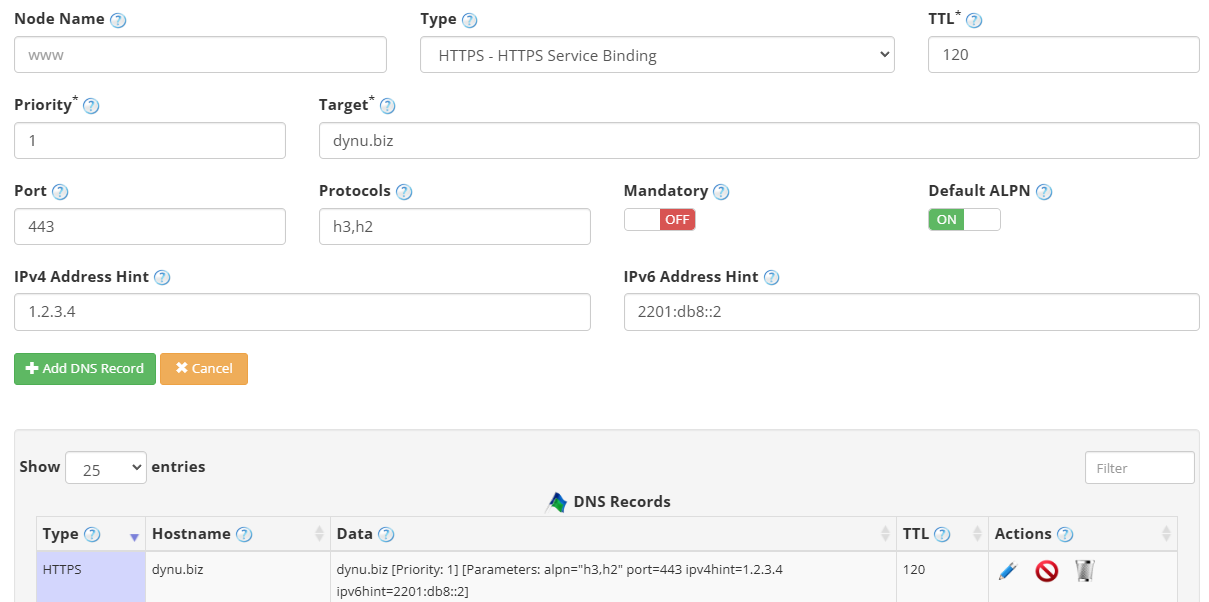
to add an HTTPS record. The screenshot below shows how to add an HTTPS record for dynu.biz.
We are leaving the node name empty because it is for the primary domain name dynu.biz.
Node Name Enter the subdomain name for which you need the HTTPS record, for example, www. Leave empty for the primary domain name.
Type Choose "HTTPS - HTTPS Service Binding".
TTL How long the server should cache the information. The TTL is set in seconds, 60 is 1 minute, 1800 is 30 minutes.
Priority A number from 0 to 65535. A value of 0 sets the record to AliasMode, which redirects the service to another domain name. A value greater than 0 sets ServiceMode, where lower values are preferred.
Target The fully qualified domain name of the target endpoint. Use a single dot (.) to indicate the service is at the owner name itself.
Port The TCP or UDP port number of the HTTPS endpoint, if different from the default port 443.
Protocols A comma-separated list of Application-Layer Protocol Negotiation (ALPN) protocol identifiers supported by the service, such as h2 for HTTP/2 or h3 for HTTP/3 over QUIC.
Mandatory Force usage of certain protocols only.
Default ALPN A flag indicating that the default HTTPS protocol should not be assumed; only the protocols explicitly listed in the alpn parameter are supported by this endpoint.
IPv4 Address Hint A comma-separated list of IPv4 addresses that clients may use as a connection hint for the target, avoiding a separate A record lookup.
IPv6 Address Hint A comma-separated list of IPv6 addresses that clients may use as a connection hint for the target, avoiding a separate AAAA record lookup.
Step 3
Check if your HTTPS record has gone into effect using the DNS Lookup tool. Enter dynu.biz as Hostname, and choose "HTTPS - HTTPS Service Binding" as Type.