




 Create SSHFP record
Dynu gives you full control over all the DNS configurations for your domain names.
You can log onto the control panel to manage your DNS records.
To add an SSHFP record in the control panel, you may follow these 3 steps.
 Step 2
Go to DNS Records
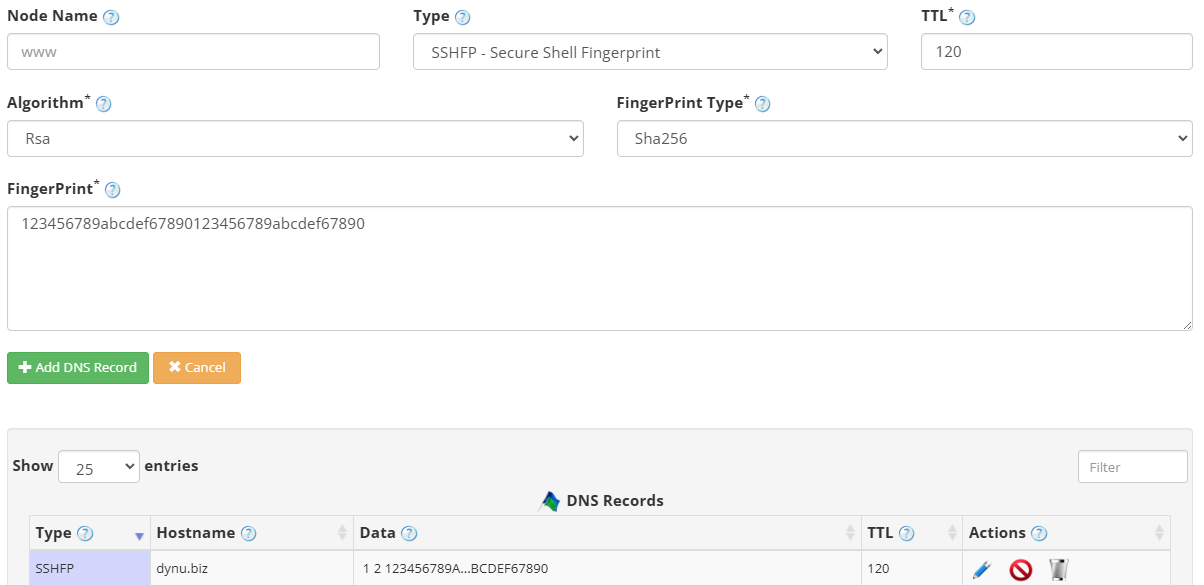
to add an SSHFP record. The screenshot below shows how to add an SSHFP record for dynu.biz.
DNS Records
to add an SSHFP record. The screenshot below shows how to add an SSHFP record for dynu.biz.
Node Name Enter the hostname of the SSH server, for example host. Leave empty for the primary domain name.
Type Choose "SSHFP - SSH Fingerprint".
TTL How long the server should cache the information. The TTL is set in seconds, 60 is 1 minute, 1800 is 30 minutes.
Algorithm The public key algorithm of the SSH host key. Use 1 for RSA, 2 for DSA, 3 for ECDSA, 4 for Ed25519, or 6 for Ed448.
Fingerprint Type The hash algorithm used to compute the fingerprint. Use 1 for SHA-1 or 2 for SHA-256. SHA-256 is recommended.
Fingerprint The hexadecimal fingerprint of the SSH host key. You can generate this on your server using the command ssh-keygen -r hostname.
Step 3
Check if your SSHFP record has gone into effect using the DNS Lookup tool. Enter dynu.biz as Hostname, and choose "SSHFP - SSH Fingerprint" as Type.

What is an SSHFP record?
Secure Shell Fingerprint (SSHFP) records publish the cryptographic fingerprints of a host's SSH public keys in DNS, allowing SSH clients to verify the authenticity of a server's identity before connecting. With SSHFP records in place and DNSSEC enabled, host key verification can be performed automatically, protecting against man-in-the-middle attacks.How to add an SSHFP record?
To add an SSHFP record in the control panel, you may follow these 3 steps.
 Step 2
Go to
DNS Records
to add an SSHFP record. The screenshot below shows how to add an SSHFP record for dynu.biz.
Node Name Enter the hostname of the SSH server, for example host. Leave empty for the primary domain name.
Type Choose "SSHFP - SSH Fingerprint".
TTL How long the server should cache the information. The TTL is set in seconds, 60 is 1 minute, 1800 is 30 minutes.
Algorithm The public key algorithm of the SSH host key. Use 1 for RSA, 2 for DSA, 3 for ECDSA, 4 for Ed25519, or 6 for Ed448.
Fingerprint Type The hash algorithm used to compute the fingerprint. Use 1 for SHA-1 or 2 for SHA-256. SHA-256 is recommended.
Fingerprint The hexadecimal fingerprint of the SSH host key. You can generate this on your server using the command ssh-keygen -r hostname.
Step 3
Check if your SSHFP record has gone into effect using the DNS Lookup tool. Enter dynu.biz as Hostname, and choose "SSHFP - SSH Fingerprint" as Type.